Posted 13 October 2026
While working on my new ‘vision-enhanced’ robot project, it became apparent the the OAK-D Lite camera was not the best tool for handling a ‘stuck’ condition where the robot has nosed into something and needs to find a better movement direction. The camera After some experimentation, I found that by moving the rear-facing VL53L1X LIDAR distance sensor to the front of the robot, I could turn the robot under manual (‘C’) control and watch the reported LIDAR distances change. Since I had already solved the ‘Find Best Direction’ problem on my older robot, I decided to port the code into the new vision-enhanced robot.
Looking back through my old code in C:\Users\Frank\Documents\Arduino\WallE3_Git\WallE3_Git\WallE3_Git.ino, I found a reference to this post. It wasn’t directly relevant as it discussed the problem of sorting multiple arrays in a synchronized fashion so as to arrive at a situation where all the distance and heading sensor arrays are sorted in lockstep with a ‘master’ array containing front distance readings. Then the ‘dependent’ array readings associated with the maximum front distance reading can be easily read off.
This isn’t really necessary for the vision-enhanced robot, as there are only two sensors of interest – the front distances and the associated headings. I believe I should be able to set up two small lists (say 10 elements; front distance readings and associated headings. As the robot rotates, each new distance reading is compared to the stored ones, and replaces the largest value that is smaller than it. The headings array value associated with the replaced heading value gets replaced by the heading value associated with the new distance value. At the end of the rotation, the distance array should contain the 10 highest distance readings, sorted in descending order, and the heading array should be synchronized to their associated distances. Then an ‘appropriate’ heading can be selected from the data (‘appropriate’ to be defined later).
It turns out UpdateIMUHdgValDeg() already manages a HEADING_HISTORY_ARRAY_SIZE array of heading values, where earlier values are bumped up (down in index) and the latest value is stored at gl_HdgHistoryArray[HEADING_HISTORY_ARRAY_SIZE – 1]. If I also have a HEADING_HISTORY_ARRAY_SIZE array of distance values that are handled in the same manner, that should be all I need. I’m pretty sure I already have that array, as that is what is used to calculate variances needed to detect ‘stuck’ conditions. Yep – its there but named ‘aRearDistCM’ instead of ‘aFrontDistCM’. I’ll let that ride until everything is working and then change ‘Rear’ to ‘Front’ everywhere. CalcBruteRearDistArrayVariance() is also there for stuck detection. bool IsStuckBehind() is missing so copied it from WallE3_Git.ino to VisionEnhancedRobot…’. ino (into MISCELLANEOUS section).
Looking back through the code and previous posts, I built up the ‘QuickSort’ algorithms to handle just this situation, so abandoning them for something simpler does not seem real smart; it’s already there, and it works.
Well, maybe not. Looking at WallE3_Git.ino, I see that the RunToDaylight() code does not appear to use QuickSort at all – it does the ‘simpler’ idea of rotating 10 deg at a time, recording both heading and distance. After the rotation I see:
|
1 2 3 4 5 6 7 8 9 10 11 12 13 14 15 16 17 18 |
//if we get to here, no anomalies were detected //now find the largest distance recorded, and the associated heading uint16_t newhighdist = 0; float newhighhdgdeg = 0; for (size_t i = 0; i < RTMD_ARRAY_SIZE; i++) { if (FrontDistCm[i] > newhighdist) { gl_pSerPort->printf("Idx/Hdg/FrontD = %d/%2.1f/%d\n", i, HdgArrayDeg[i], FrontDistCm[i]); newhighdist = FrontDistCm[i]; newhighhdgdeg = HdgArrayDeg[i]; } } //at this point newhighdist holds highest distance from sweep, and newhighhdgdeg holds the heading assoc with that dist gl_pSerPort->printf("RotateToMaxDistance: highdist = %d, highhdg = %2.1f\n", newhighdist, newhighhdgdeg); TurnToHdgDeg(newhighhdgdeg); |
which is pretty much exactly the ‘simpler’ idea I was thinking about.
Well, I may have spoken too soon. WallE3_Git.ino has *two* ‘RunToDaylight()’ functions, ‘RunToDaylight()’ and ‘RunToDaylightV2()’, and ‘RunToDaylight()’ is apparently never called and was replaced by ‘RunToDaylightV2()’ which incorporates the QuickSort algorithms. However, only RunToDaylightV2() Step5:
|
1 2 3 |
//Step5: If no trackable wall is found, turn to the heading value that corresponds to the central element // of the first(only) group of front distance values > MIN_RUN_TO_DAYLIGHT_DIST_CM, and return with // WallTrackingCases TRACKING_NEITHER |
applies to this situation – all the other code is aimed at finding a trackable wall. Step5 is basically ‘RunToDaylight()’ with the distance and heading arrays presorted by decreasing distance with
|
1 |
QuickSortAll(false, FrontD, Hdg, LeftD, LeftSteer, RightD, RightSteer, 0, QUICKSORT_ARRAY_SIZE - 1); |
I made the decision to port all the ‘RunToDaylightV2()’ and supporting code to the new ‘stuck-recovery’ branch, trimmed down to just the ‘Hdg’ and ‘FrontD’ arrays for now (may later want to add RearD, but not now). This is basically just the ‘Step5’ portion of ‘RunToDaylightV2()’, with the addition of all the supporting code for QuickSort operations.
I have the ‘stuck ahead’ detection running now. Here’s a sample output:
|
1 2 3 4 5 6 7 8 9 10 11 12 13 14 15 16 17 18 |
Time BattV TopI BotI ChgI FrontCm FrontVar Hdg Lspd Rspd 9644 8.11 0.45 0.01 0.40 406.60 49148.18 0.07 0 0 10678 8.12 0.45 0.01 0.41 414.10 37536.78 0.09 0 0 11645 8.11 0.41 0.00 0.41 403.10 40442.10 0.12 0 0 12643 8.11 0.44 0.00 0.42 425.30 41701.23 0.15 0 0 13674 8.11 0.40 0.00 0.41 423.30 20153.20 0.18 0 0 14641 8.10 0.40 0.00 0.41 422.20 322.83 0.21 0 0 15712 8.11 0.42 0.00 0.41 0.60 5123.27 0.24 0 0 16736 8.11 0.42 0.00 0.41 0.00 20043.77 0.27 0 0 17759 8.11 0.44 0.00 0.41 0.00 31153.34 0.31 0 0 18693 8.10 0.45 0.01 0.41 0.00 37684.86 0.34 0 0 19716 8.11 0.42 0.00 0.42 0.00 40898.73 0.37 0 0 20748 8.11 0.43 0.01 0.41 0.00 40524.75 0.40 0 0 21674 8.10 0.44 0.00 0.41 0.00 36600.52 0.42 0 0 22695 8.12 0.40 0.00 0.41 0.00 28881.70 0.43 0 0 23729 8.12 0.46 0.00 0.41 0.00 16428.35 0.43 0 0 24752 8.12 0.44 0.01 0.41 0.00 0.00 0.43 0 0 Stuck Ahead Detected at 24836: gl_FrontCm = 0.1, FrontVar = 0.0 |
The next step is to use the ‘RunToDaylightV2()’ function and supporting QuickSort code to determine the best direction to travel *after* IsStuck() returns TRUE.
18 October 2026 Update:
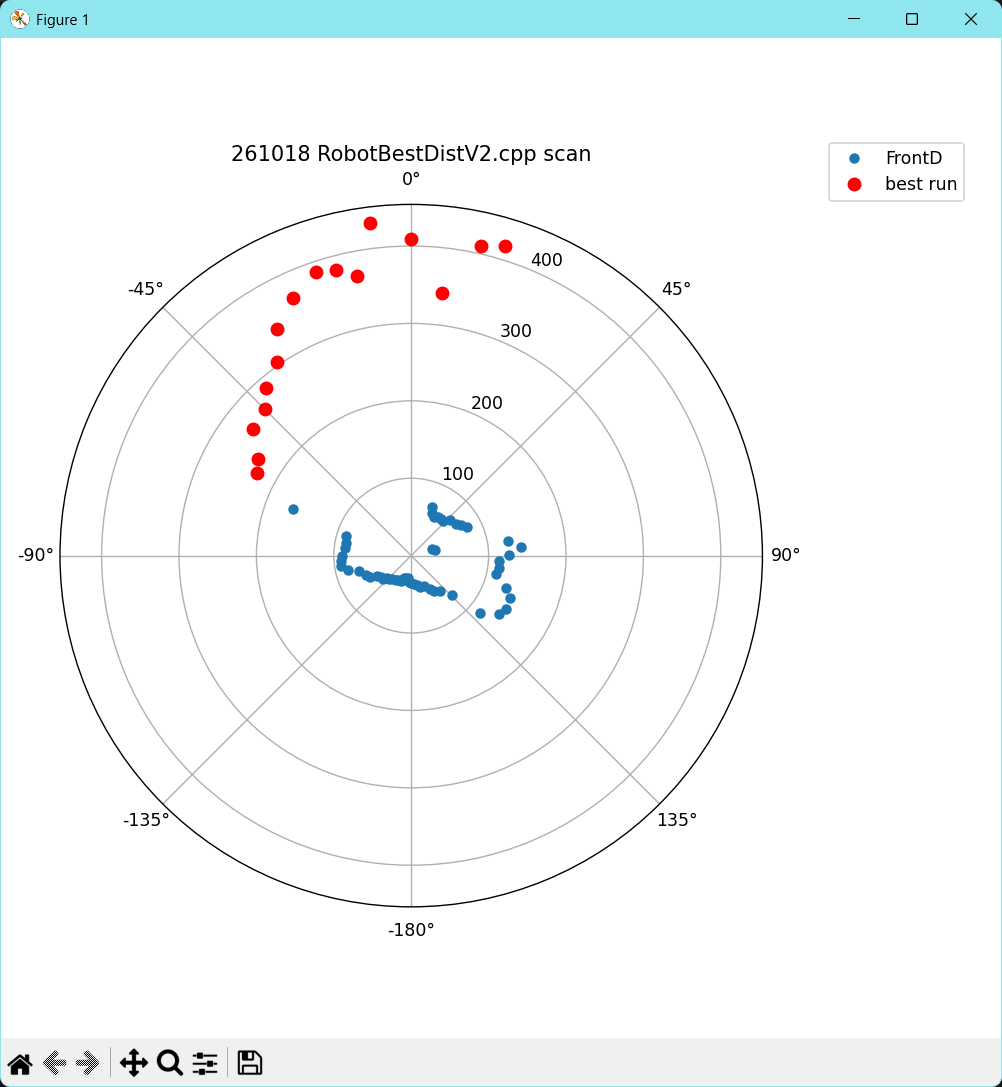
After getting the stuck-recovery code working, I created a new C++ project on my PC to parse through the output generated by the 360 degree scans from ‘stuck-recovery’. Here’s the final code:
|
1 2 3 4 5 6 7 8 9 10 11 12 13 14 15 16 17 18 19 20 21 22 23 24 25 26 27 28 29 30 31 32 33 34 35 36 37 38 39 40 41 42 43 44 45 46 47 48 49 50 51 52 53 54 55 56 57 58 59 60 61 62 63 64 65 66 67 68 69 70 71 72 73 74 75 76 77 78 79 80 81 82 83 84 85 86 87 88 89 90 91 92 93 94 95 96 97 98 99 100 101 102 103 104 105 106 107 108 109 110 111 112 113 114 115 116 117 118 119 120 121 122 123 124 125 126 127 128 129 130 131 132 133 134 135 136 137 138 139 140 141 142 143 144 145 146 147 148 149 150 151 152 153 154 155 156 157 158 159 160 161 162 163 164 165 166 167 168 169 170 171 172 173 174 175 176 177 178 179 180 181 182 183 184 185 186 187 188 189 190 191 192 193 194 195 196 197 198 199 200 201 202 203 204 205 206 207 208 209 210 211 212 213 214 215 216 217 218 219 220 221 222 223 224 225 226 227 228 229 230 231 232 233 234 235 236 237 238 239 240 241 242 243 244 245 246 247 248 249 250 251 252 253 254 255 256 257 258 259 260 261 262 263 264 265 266 267 268 269 270 271 272 273 274 275 276 277 278 279 280 281 282 283 284 285 286 287 288 289 290 291 292 293 294 295 296 297 298 299 300 301 302 303 304 305 306 307 308 309 310 311 312 313 314 315 316 317 318 319 320 321 322 323 324 325 326 327 328 329 330 331 332 333 334 335 336 337 338 339 340 341 342 343 344 345 346 347 348 349 350 351 352 353 354 355 356 357 358 359 |
// QuickSortV3.cpp : This file contains the 'main' function. Program execution begins and ends there. // /*Quicksort Test program The idea is to determine whether or not I can sort multiple associated arrays by sorting a 'master' array (say front distances) and having other arrays be sorted using the same sort index sequence as the master array. Master (front distance) FrontD: int FrontD[] = { 219, 30, 114, 152, 41, 86 }; Slave (Heading) array: float Hdg[] = { 19, 3, 11, 15, 4, 8 }; */ #include <iostream> #include <sstream> #include <string> #include <vector> using namespace std; //int FrontD[] = { 9, 3, 4, 2, 1, 8 }; ////real measurement data //float FrontD[] = { 121.6, 124.1, 146.4, 114.2, 67.6, 59.9, 48.4, 44.2, 35.3, 37.9, 40.1, 42.8, 46.3, 52.4, 59.5, 93.0, 91.3, 85.5, 101.9, 229.0, 260.7, 312.9, 388.1, 414.6, 347.8, 58.1, 51.5, 54.8, 59.5, 75.7, 98.1, 38.3, 121.5, 114.5, 130.8, 138.5 }; //float Hdg[] = { 0.0, 9.4, 18.7, 28.5, 39.1, 49.2, 59.1, 69.2, 78.8, 88.4, 99.0, 109.0, 118.5, 128.3, 138.1, 154.9, 164.7, 174.2, -176.3, -160.3, -149.0, -138.9, -129.9, -118.0, -106.8, -96.8, -87.3, -77.5, -67.9, -58.1, -47.7, -37.4, -28.0, -18.2, -8.7, 1.1 }; std::vector<float> FrontD; std::vector<float> Hdg; //new plan; convert the arrays from the tabular form as they come off the generating program into the comma-delimited arrays as shown above //const char* rawScan = R"( //MSec FrontD Hdg //8717 106.0 0.0 //8979 427.9 6.1 //9179 79.4 10.2 //9443 57.6 16.4 //9707 58.0 22.6 //9914 61.6 26.5 //10177 62.5 33.0 //10441 67.7 39.2 //10650 77.5 43.6 //10913 85.0 49.9 //11177 138.8 56.4 //11321 123.8 60.2 //11585 134.4 66.7 //11847 134.8 72.4 //12056 133.9 76.4 //12319 128.8 82.2 //12528 124.3 86.5 //12791 143.5 92.5 //12991 148.4 96.4 //13255 148.8 102.3 //13399 145.0 106.5 //13661 118.6 112.8 //13870 77.6 116.6 //14133 70.7 122.5 //14277 62.9 126.7 //14541 60.7 133.0 //14685 52.5 136.9 //14949 48.2 143.4 //15213 44.5 149.5 //15595 37.3 160.1 //15859 35.5 165.8 //16123 36.3 171.4 //16332 38.9 175.2 //16596 38.8 -179.4 //16859 38.6 -173.8 //17123 40.2 -167.7 //17330 42.8 -163.7 //17593 43.2 -157.8 //17857 46.0 -152.1 //18121 49.9 -146.2 //18385 55.4 -140.1 //18585 61.1 -136.2 //18849 68.1 -129.9 //19113 78.3 -124.0 //19320 90.2 -119.2 //19583 89.3 -113.4 //19792 86.0 -109.1 //20055 84.2 -102.9 //20255 84.2 -98.8 //20519 89.2 -93.2 //20783 205.2 -87.2 //20927 225.2 -83.2 //21189 224.6 -77.8 //21453 237.6 -71.5 //21542 251.6 -67.2 //21805 276.1 -61.3 //21949 284.7 -57.2 //22213 321.4 -50.9 //22413 362.0 -47.0 //22677 396.5 -40.7 //22877 395.9 -36.7 //23139 395.1 -30.7 //23403 353.2 -25.2 //23612 262.6 -21.1 //23875 395.7 -15.0 //24139 50.5 -8.9 //24403 46.9 -2.8 //24667 47.5 3.2 //24874 50.3 7.2 //25137 52.1 13.3 //25401 57.3 19.2 //25610 62.9 23.2 // //)"; const char* rawScan = R"( MSec FrontD Hdg 8632 408.9 0.0 8894 433.5 - 7.1 9038 367.9 - 11.0 9238 381.3 - 14.7 9438 386.8 - 18.5 9702 366.9 - 24.7 9964 340.4 - 30.6 10173 304.5 - 34.8 10436 286.4 - 40.8 10645 266.9 - 44.9 10908 262.1 - 51.3 11172 233.7 - 57.6 11372 225.6 - 61.7 11636 163.5 - 68.6 11843 87.8 - 72.9 12106 85.9 - 79.1 12315 86.2 - 83.3 12578 89.7 - 89.9 12722 91.3 - 94.4 12922 91.2 - 98.1 13122 83.4 - 102.5 13322 70.8 - 106.3 13586 63.7 - 112.9 13673 60.1 - 117.0 13881 51.5 - 121.0 14024 48.0 - 125.1 14233 47.6 - 129.1 14376 42.9 - 132.8 14576 42.1 - 137.0 14776 38.5 - 141.0 15040 37.1 - 147.9 15240 35.3 - 151.7 15504 34.7 - 158.7 15648 29.8 - 162.9 15855 29.9 - 166.6 15943 29.9 - 170.9 16151 33.8 - 174.7 16414 35.2 180.0 16678 36.9 174.2 16942 38.2 168.1 17142 41.7 163.9 17406 42.9 157.2 17733 50.1 150.7 17876 54.3 146.6 18140 58.9 140.1 18404 73.2 133.9 18604 115.9 129.9 18868 135.9 123.7 19068 140.8 119.5 19332 139.3 113.3 19539 129.8 108.9 19802 111.7 102.3 19891 114.4 98.2 20099 113.3 93.8 20178 126.3 89.8 20387 142.0 85.6 20530 126.3 81.3 20730 31.2 77.3 20874 27.9 72.8 21194 81.5 62.8 21401 76.0 58.6 21544 70.9 54.5 21808 67.4 47.3 21952 61.0 43.1 22161 60.6 39.2 22304 60.0 34.8 22504 57.9 31.0 22704 61.2 26.7 22904 68.7 23.0 23168 417.9 16.9 23375 410.2 12.7 23638 341.2 6.7 )"; //int n = 36; //#define NUM_SAMPLES 36 int n = 72; #define NUM_SAMPLES 72 int THRESHOLD = 200; struct RunItem { float Hdg = 0; float Dist = 0; }; int bestStart = -1, bestEnd = -1; float bestWidth = 0; int numruns = 0; int runStart = -1; RunItem samples[NUM_SAMPLES]; // or 72 void ParseScan() { std::istringstream iss(rawScan); std::string line; while (std::getline(iss, line)) { if (line.empty() || line.find("FrontD") != std::string::npos) continue; // normalize whitespace and the spaced minus that paste sometimes inserts for (char& c : line) if (c == '\t') c = ' '; size_t pos; while ((pos = line.find(" - ")) != std::string::npos) line.replace(pos, 3, "-"); while ((pos = line.find(" -")) != std::string::npos) line.replace(pos, 2, "-"); std::istringstream row(line); float msec, dist, hdg; if (row >> msec >> dist >> hdg) { FrontD.push_back(dist); Hdg.push_back(hdg); } } cout << "FrontD has " << FrontD.size() << " elements\n"; } void TerminateRun(int i) { // run ended at i-1 float width = samples[i - 1].Hdg - samples[runStart].Hdg; //watch out for 'fold' width results > 180 or < -180 if (width > 180) { width -= 360; } else if (width < -180) { width += 360; } width = abs(width); if (width > bestWidth) { bestWidth = width; bestStart = runStart; bestEnd = i - 1; } runStart = -1; numruns++; } // fill samples[] during the scan (or copy from your existing arrays) void GetBestDistance() { //Purpose: Determine 'Best Distance' from a set of NUM_SAMPLES Hdg/Dist pairs //Inputs: // Fixed set of real samples in FrontD[NUMSAMPLES] and Hdg[NUMSAMPLES] synchronized arrays //Outputs: // bestWidth = width (in deg) of the largest contiguous run of FrontD measurements // bestStart, bestEnd = start & end idices for the 'bestWidth' run //Plan: // Step1: fill samples[] during the scan (or copy from your existing arrays) // Step2: work through entire Hdg/Dist sample items looking for contiguous runs (can be just one item) // for each such run, calc bestWidth, bestStart, bestEnd. If 'bestWidth' is greater than all // previous runs detected, replace the old bestWidth, bestStart, bestEnd values // Step3: If there are multiple 'far' runs, check to if two of them can be stitched // together around the +/- 0 degree fold. //Step1: fill samples[] during the scan (or copy from your existing arrays) ParseScan(); //Step2: work through entire Hdg/Dist sample items looking for contiguous runs (can be just one item) // for each such run, calc bestWidth, bestStart, bestEnd. If 'bestWidth' is greater than all // previous runs detected, replace the old bestWidth, bestStart, bestEnd values for (int i = 0; i < NUM_SAMPLES; i++) { samples[i].Dist = FrontD[i]; samples[i].Hdg = Hdg[i]; //print out for debug cout << "samples[" << i << "] = (" << samples[i].Dist << ", " << samples[i].Hdg << ")\n"; } for (int i = 0; i < NUM_SAMPLES; i++) { if (samples[i].Dist >= THRESHOLD) { if (runStart < 0) { runStart = i; } // don’t forget to close a run that reaches the end of the array //terminate this run if we run out of samples if (i >= NUM_SAMPLES-1) { TerminateRun(i); } // start a new run // else just keep extending } //this doesn't execute unless samples[i] < THRESHOLD else if (runStart >= 0 ) { TerminateRun(i); } } //Step3: If there are multiple 'far' runs, check to if two of them can be stitched // together around the +/- 0 degree fold. if (samples[0].Dist >= THRESHOLD && samples[NUM_SAMPLES - 1].Dist >= THRESHOLD) { // find how far the opening extends from each end int endRun = NUM_SAMPLES - 1; while (endRun > 0 && samples[endRun].Dist >= THRESHOLD) endRun--; endRun++; // first index of the trailing far run int startRun = 0; while (startRun < NUM_SAMPLES - 1 && samples[startRun].Dist >= THRESHOLD) startRun++; startRun--; // last index of the leading far run // angular width across the fold float width = samples[startRun].Hdg - samples[endRun].Hdg; if (width > 180) width -= 360; if (width < -180) width += 360; width = fabs(width); if (width > bestWidth) { bestWidth = width; bestStart = endRun; bestEnd = startRun; numruns--; // the two fragments are now one physical run } } cout << "numruns = " << numruns << ", bestwidth = " << bestWidth << ", bestStart = " << bestStart << ", bestEnd = " << bestEnd; return; } int main() { GetBestDistance();//added 10/17/26 to isolate new code return 0; } |
Including both 36-point (10 deg steps) and a 72-point (5 deg steps) datasets from the ‘stuck-recovery’ code. With the 72-point (5 deg steps) scan data active, the .cpp program produces the following output